
You can pick the date and time for individual pairings in two ways on MeinTurnierplan: they are calculated automatically in the third step of Prepare Tournament. Afterwards you can change the date and time for pairings individually.
Set dates and times for group matches
The time for group matches can be set in step three of Prepare Tournament. Here, you can enter the start time, duration of a match in the group phase as well as breaks of the group phase.
Set dates and times for final rounds
If the tournament is in a mode that has a final round, you can also set the duration of final round matches as well as the duration of breaks in the final round.
Set dates and times for leagues
For league matches you can make additional settings concerning matchdays. In the third step of Prepare Tournament you can enter the first day of the tournament, the usual start time and the duration of a match in minutes. Also, you can set the matchdays which will be the weekdays when individual pairings are happening.
By clicking Refresh Matchdays the individual matchdays with their starting time will be worked out.
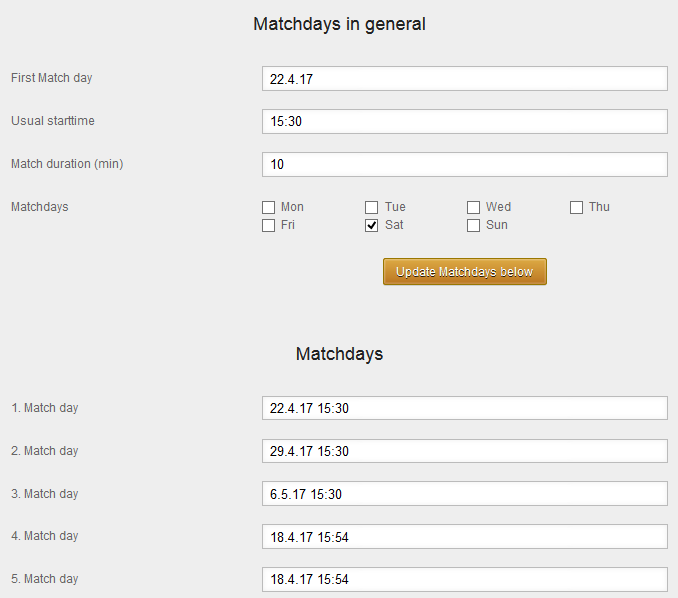
Now, times for the individual matchdays can be edited in the boxes below.
Change dates and times for matches
If you’d like to change the date and time for individual matches go to the page Run Tournament and click on Change match sequence, times, fields, placements. On this page you can change the times for individual matches in the column Start.

If the box Automatically continue times on change is activated, the start times of all following matches will be shifted after the change of one start time. This can be very helpful when you want to add long breaks for instance.

If you don’t want that, just deactivate this box.
Reset dates and times for matches
If you’d like to renew the times for a tournament and want them to be automatically calculated, just click on the little triangle next to Change durations of matches and breaks or in the case of leagues click Change Matchdays. The same form is opening that you already saw in Prepare Tournament.

By clicking on Refresh Time all start times of the tournament will be updated.